Case study 02 · EdTech / Leadership coaching
LeadWell Coach
Slack bot that keeps leadership training alive
I built a Slack bot that sends leadership and management coaching content on a schedule each user picks. It personalises content from the participant's own workbook slides, and falls back to the approved guidebook for everyone else. Follow-up content now reaches every participant with no manual messages.
▶ Try the live demo
- Client
- A leadership coaching and training company
Live demo
Try LeadWell Coach yourself
An interactive recreation that runs in your browser.
Problem
Problem statement
Participants forgot most of the workshop within weeks. Coaches had no simple way to keep sending each person relevant leadership material.
Context
The client runs leadership and management workshops for companies. Participants already work in Slack. The approved course content lives in one master guidebook PDF. Each participant also gets a workbook PPT, where they write their own strategies, people, philosophy and priorities.
Why it matters
Reinforcement after training is what turns a workshop into a habit. It is also what client companies pay for when they renew.
Constraints
- Content had to come from approved course material only.
- Many participants never fill in or upload their workbook, so the bot must still be useful without it.
- Each user picks their own delivery frequency.
- The bot installs into each client company's own Slack workspace.
- A fixed phase budget of about 70 hours.
Success criteria
Every participant gets on-topic content at their chosen interval. Those who upload a workbook get content about their own situation. Coaches update the master content without a developer.
Solution
What it does
An admin uploads the master guidebook PDF. The service parses it, embeds it with OpenAI and stores it as the shared knowledge base. The admin registers each participant by name and work email. When a client company installs the bot in Slack, the service reads the workspace members and links each registered participant by email. The participant gets a welcome DM, also sent the first time they open the bot's Home tab.
The welcome DM invites them to share their filled workbook, either as a file in the DM or as a link with /refresh <link>. The bot then sends short leadership and management content by DM on the user's schedule:
No workbook
generic content from the master guidebook, such as quotes, tips and short lessons built on program tools like the Eisenhower Matrix and the 10-10-10 rule.
Workbook uploaded
personalised content that weaves the user's own strategies and values into the guidebook material.
Each message is numbered by week and builds on the last one, so the series reads as a program, not random tips. Users change their schedule with /frequency weekly, bi_weekly or monthly, and send /refresh again any time to update their workbook.
Key features
- 01
Admin uploads the master guidebook once. It is parsed and embedded with OpenAI as the shared knowledge base.
- 02
One-click Slack install per client workspace, with participants matched by email and greeted by DM.
- 03
Workbook upload as a Slack file or a link, filtered to the slides that matter.
- 04
Two content modes: generic from the guidebook, or personalised from the workbook plus the guidebook.
- 05
Scheduled DMs, weekly, bi-weekly or monthly, with each message following on from the last.
Key design decisions
Embed the guidebook and workbooks in a vector index, split shared vs per user
- Reason
- Retrieval pulls only approved text, and one user never sees another's workbook
- Rejected option
- Pasting the whole guidebook into every prompt
Generic fallback when no workbook exists
- Reason
- Most users never upload one. The bot still delivers value from day one.
- Rejected option
- Blocking content until a workbook is uploaded
Keep only the strategy slides from the workbook
- Reason
- Cuts noise from title and instruction slides and keeps the prompt small
- Rejected option
- Embedding every slide
Pass the last message and week number to the model
- Reason
- Gives a steady program arc and avoids repeats
- Rejected option
- Independent one-off messages
Match Slack users by registered email
- Reason
- Only enrolled participants get content, with no manual linking
- Rejected option
- Messaging every workspace member
Event work in background tasks
- Reason
- Slack needs a reply within 3 seconds, and parsing takes longer
- Rejected option
- Processing inside the request
Alternatives considered
I looked at fine-tuning a model on the guidebook. It cost more, was slower to update and could not stay strictly on the approved text. Retrieval over embeddings was cheaper and updates as soon as a new PDF is uploaded.
How it works
- 01
The admin uploads the guidebook PDF. LlamaParse extracts the text, OpenAI embeds it, and the chunks go into the shared set in Pinecone.
- 02
The admin registers participants by name and email.
- 03
A client company installs the bot through Slack OAuth. The service saves the workspace token, lists members and links registered participants by email. Each gets a welcome DM.
- 04
A participant shares a workbook in the DM or with
/refresh <link>. The service downloads it, keeps only the strategy slides, and embeds them in that user's own set. Any older workbook is replaced. - 05
The scheduler runs on Mondays. It finds users due for content and groups them by workspace.
- 06
For each user it searches their own chunks first. If none exist, it falls back to the shared guidebook chunks.
- 07
GPT-4o writes the next week's message, using the user's name, the chunks and the previous message.
- 08
The bot sends the DM, saves the message and sets the next delivery date from the user's frequency.
Infra and deployment
The service runs in Docker, with Docker Compose for local work. Poetry manages dependencies. Alembic migrations run on startup. The scheduler runs in its own thread inside the app. pytest covers the content delivery flow.
Security
Slack OAuth with a state check that expires in 5 minutes. Tokens and API keys come from environment config, never code. Workbook vectors are tagged per user, so retrieval never mixes users.
Challenges
Users without a workbook
- Problem
- Most participants never upload one
- Approach
- Built a generic mode that falls back to the shared guidebook chunks
- Outcome
- Every user gets content from day one
Duplicate Slack events
- Problem
- Slack retries and sends file events twice
- Approach
- Tracked in-flight file and user IDs and skipped repeats
- Outcome
- One reply and one parse per upload
Reading workbook slides
- Problem
- Answers sit in text boxes across many slides
- Approach
- Parsed with LlamaParse and kept only slides with the strategy headings
- Outcome
- Clean input for personalised content
Repetitive messages
- Problem
- Each message read like the last
- Approach
- Numbered weeks and passed the previous message to the model
- Outcome
- A steady weekly arc
Tight budget
- Problem
- About 70 hours for the whole phase
- Approach
- Kept a layered template and fixed frequency options
- Outcome
- Phase shipped in about 5 weeks
Results
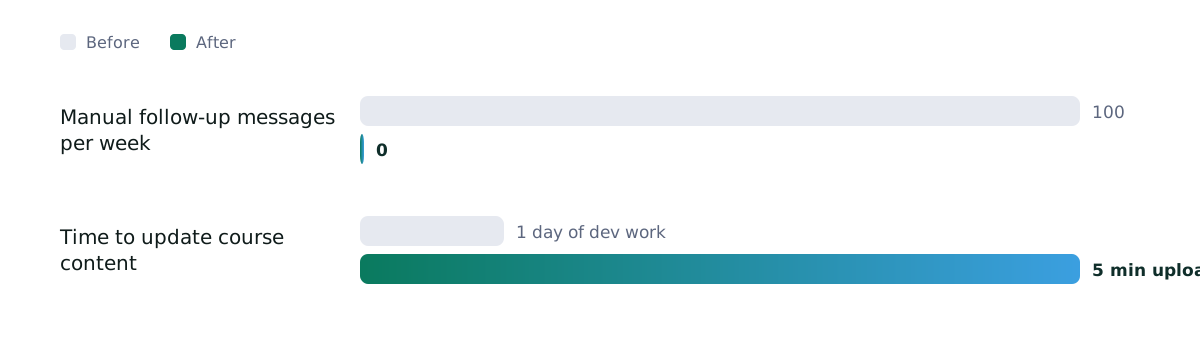
Manual follow-up messages per week
0
from 100
Time to update course content
5 min upload
from 1 day of dev work
Post-workshop interactions
About 3x more
from Low
Business impact
Coaches stopped sending follow-ups by hand. The client can sell ongoing reinforcement with its workshops, with a personal tier for participants who share their workbook.
Technical impact
One scheduler serves both content modes and many workspaces. A new command is a controller plus a service, with no changes elsewhere.
Skills and tech stack
Backend
AI / ML
Cloud / DevOps
Integrations
Testing
Reflection
What worked
The generic fallback meant the bot was useful to everyone, not only to users who filled in the workbook.
What I would do differently
Use a proper job queue for scheduled sends, so a restart never skips a delivery, and store OAuth state in the database instead of files.
What's next
An admin screen for participants and guidebooks, feedback on each message, and a nudge for users still on generic content.
Key learning
Design for the user who skips the setup step. They are usually the majority.
Next step
Need something similar?
Code walkthrough available on request.