Case study 01 · HR Tech / Employee onboarding
OnboardIQ
voice AI assistant that fills new-hire forms
I built a voice AI assistant that interviews new hires in English or Spanish, asks each question only once across three forms, and returns signed W-4, DE 4 and I-9 PDFs. Onboarding paperwork time dropped from about 45 minutes to about 10.
▶ Try the live demo
- Client
- A US HR and employee-benefits services firm
Live demo
Try OnboardIQ yourself
An interactive recreation that runs in your browser.
Problem
Problem statement
New hires typed the same personal details into several federal and state forms by hand. Errors and blank fields were common.
Context
Every hire needs a W-4 (federal tax), a DE 4 (California tax) and an I-9 (work eligibility). Each form repeats name, address and SSN, then adds its own fields. HR staff then retyped or corrected the forms. Many hires speak Spanish as a first language.
Why it matters
Wrong or late forms carry compliance risk. They also slow down a new hire's first day and cost HR time on every hire.
Constraints
- Highly sensitive data: SSNs, immigration document numbers, signatures.
- I-9 fields change based on citizenship status.
- Output had to be the official PDFs, with signatures and dates in the right boxes.
- Users are often not technical, so the interview runs by voice.
- Every signature needs an audit trail: who signed, when and from where.
Success criteria
A new hire finishes all three forms in one voice session, never answers the same question twice, and HR gets complete, signed PDFs with no retyping.
Solution
What it does
The hire opens the app and picks English or Spanish. A screen lists the identity documents they will need (one from List A, or one from List B plus one from List C). Then they meet the assistant. There is no chat interface: the interview is voice only. An animation shows when the AI is speaking and when it is listening, and an animated transcript shows what the AI says, so the hire can read anything they did not catch. The hire presses Speak and answers out loud. After five seconds of silence the answer is sent.
After each answer the AI reads it back, letter by letter for names and email, and digit by digit for numbers like the mobile number, date of birth and SSN, and asks the hire to confirm before saving. A wrong read-back means the hire simply says it again. The assistant first collects basic details (name, address, date of birth, SSN, phone, email, emergency contact). It then goes through the DE 4, the I-9 and a short W-4 step, and asks only for the fields that are still missing. It refers to each one only as "an employment form".
Next, a dialog opens to upload photos of the identity documents. Then a review screen shows everything collected. The hire confirms, or says it is wrong and the assistant fixes it. Finally the hire signs, either by drawing with the mouse on a canvas or by typing their name. The signature is stamped on every form with the date, time and IP address. A closing dialog ends the session and opens a short feedback form.
Key features
- 01
Voice-only interview in English or Spanish, with speaking and listening animations and an animated transcript.
- 02
Read-back confirmation of every answer, spelled letter by letter or digit by digit, saved only after the hire says yes.
- 03
Basic details first, then a per-form gap check, so no question is asked twice.
- 04
Document upload, a full review screen, and a drawn or typed signature with date, time and IP.
- 05
Automatic filling of W-4, DE 4 and I-9 PDFs, stored in private S3 and read only through presigned URLs.
Key design decisions
Voice only, with a transcript
- Reason
- Non-technical hires speak more easily than they type. The transcript covers accents, noise and hearing issues.
- Rejected option
- A text chat with optional voice
Read back and confirm every answer
- Reason
- Speech recognition mishears names and digits. Spelling it back catches errors before they reach a federal form.
- Rejected option
- Letting HR fix errors after submission
A server-side step machine drives the UI
- Reason
- The backend decides when to show upload, review or signature. The frontend just reacts to the step.
- Rejected option
- Letting the model decide when to open screens
Capture data only through LLM tool calls
- Reason
- Gives typed, validated fields. The model never writes form data free-form.
- Rejected option
- Parsing the transcript afterwards
Stream text and audio in one multipart response
- Reason
- Voice starts playing while the model is still writing
- Rejected option
- Wait for the full reply, then synthesize
Presigned S3 URLs only
- Reason
- Signatures and IDs are never public, and links expire
- Rejected option
- Public bucket objects
Alternatives considered
I looked at a plain web form wizard. It was cheaper but did not meet the voice goal. I also looked at a PDF form-filling and e-sign SaaS, but it would send SSNs to another vendor.
How it works
- 01
The hire picks a language and reads the required-documents list. The app creates a session.
- 02
Each answer goes to the form service, which looks up the session step and forwards the message to the assistant service with that step.
- 03
The assistant service loads the prompt for the step and language, calls the OpenAI Assistants API, and streams text and ElevenLabs audio back as one multipart response.
- 04
The UI plays the audio, shows the transcript, then listens again. The AI reads back each answer and waits for a yes.
- 05
When a step is complete, a tool call saves the fields (basic details, DE 4, I-9, W-4). The form service validates them, for example a USCIS or A-Number for permanent residents, and moves the step forward.
- 06
At the upload step the UI opens the upload dialog. Files go to private S3 through multer.
- 07
At the review step the UI shows all fields. A "no" sends the hire back to correct them.
- 08
At the signature step the hire draws or types a signature. It is saved with date, time and IP.
- 09
The PDF engine fills each form and stamps the signature and audit data at fixed coordinates. Finished forms stay in S3 and are read only through presigned URLs.
Infra and deployment
All three services run as Docker containers, with Docker Compose for local work. Alembic seeds prompts and tool definitions in the assistant database. Azure Pipelines builds images on pushes to develop, staging and main and pushes them to a private registry. nginx serves the frontend build. Non-production builds show a Restart button for testing.
Security
Private S3 bucket and short-lived presigned URLs. Each signature carries its date, time and IP. Request validation with express-validator. Secrets in pipeline variables, not in code. Structured logs with Pino.
Challenges
Repeated questions
- Problem
- All three forms ask for name, address and SSN
- Approach
- Collected basic details first, copied shared answers into each form, asked only for gaps
- Outcome
- Each question asked once
Conditional I-9 rules
- Problem
- Required fields depend on citizenship status
- Approach
- Encoded the branches in the prompt and again in backend validation
- Outcome
- Far fewer incomplete I-9s
Slow voice replies
- Problem
- Waiting for full text before speech felt laggy
- Approach
- Streamed text and audio chunks in one multipart response and queued playback
- Outcome
- Voice starts in about a second
Drawing on official PDFs
- Problem
- Signatures and dates did not show in plain text fields
- Approach
- Rendered signature, date, time and IP as images and placed them with pdf-lib per form
- Outcome
- Output matched the official layout
Endless chats
- Problem
- The assistant kept talking after all data was in
- Approach
- Added a complete step and an end-of-session dialog
- Outcome
- Shorter sessions and lower token use
Results
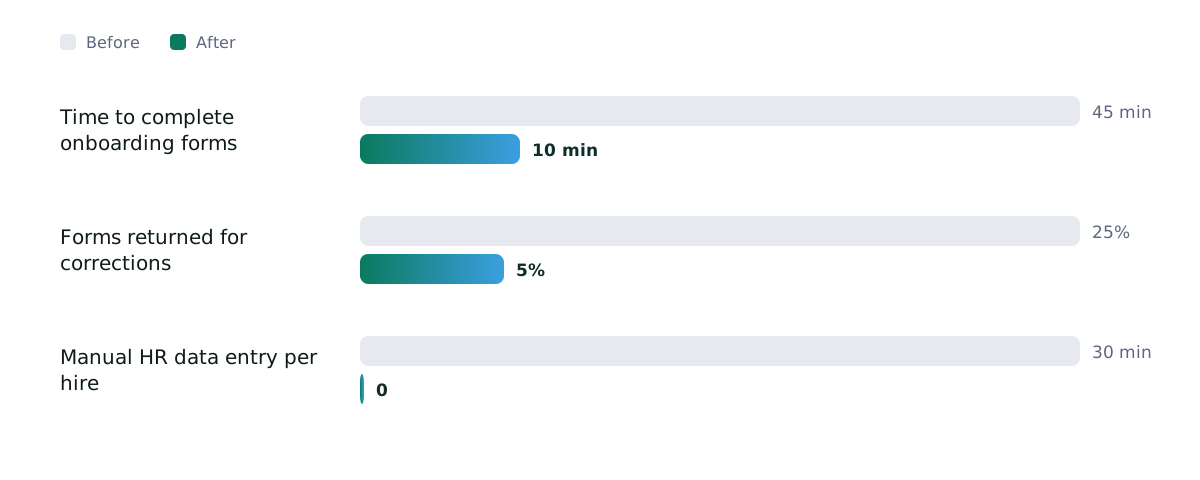
Time to complete onboarding forms
10 min
from 45 min
Forms returned for corrections
5%
from 25%
Manual HR data entry per hire
0
from 30 min
Business impact
HR no longer retypes forms. New hires finish paperwork before day one, in their own language.
Technical impact
Three services that deploy on their own. Form data is typed end to end, from tool call to database to PDF.
Skills and tech stack
Frontend
Backend
AI / ML
Documents
Cloud / DevOps
Reflection
What worked
A backend step machine plus tool calls turned a loose voice conversation into clean, typed data.
What I would do differently
Add field-level encryption for SSNs from day one instead of relying on database and transport security.
What's next
More state tax forms and an HR review dashboard.
Key learning
Let the LLM talk, but let code own the data and the flow.
Next step
Need something similar?
Code walkthrough available on request.